Grok Pricing 2026: Plans, Costs & X Subscription
Trying to figure out what Grok costs has become a little confusing. Older reviews still talk about SuperGrok and SuperGrok Heavy, while the checkout page now shows Plus, Premium, Super, and Ultra. And why is Cursor, an AI coding tool, part of the deal?
Here's the short answer: new paid Grok subscriptions start at $8 a month, with higher tiers at $30, $100, and $200. Those prices are part of the X Subscription introduced in October 2026. The old SuperGrok plans haven't disappeared for existing customers, but they're not the same as the new tiers.
Prices and plan details checked October 29, 2026. Figures are US-dollar list prices, before any applicable taxes or fees.
Part 1: How much is Grok per month?
Here are the current individual prices, including the free tier. They're also listed on the Grok pricing page.
| Plan | Monthly | Annual billing | Included AI usage |
|---|---|---|---|
| Free | $0 | $0 | Limited |
| Plus | $8 | $80/year | Base allowance |
| Premium | $30 | $300/year | 4× Plus |
| Super | $100 | $1,000/year | 15× Plus |
| Ultra | $200 | $2,000/year | 50× Plus |
Annual plans are billed upfront. Prices and taxes may vary by location or purchase channel.
Premium works out to $25 a month on annual billing, compared with $30 on monthly billing. That's a decent saving if you know you'll keep using it. If you're still trying Grok out, though, paying monthly gives you an easier exit.
One detail matters more than the big usage multipliers: 4× usage doesn't mean four times as many chat messages. Voice, image generation, and agent tasks can use your allowance differently. There's no reliable one-number answer to “How many prompts do I get?”
Part 2: Which Grok plan is actually worth it?
Start with how you'll use Grok, not the biggest number on the pricing table.
Free — for occasional questions
If you open Grok now and then to ask a question or test an idea, try the free version first. Access is limited, but it's enough to get a feel for the service before committing to a subscription.
Plus ($8/month) — for lighter, regular use
Plus gives you more room to use Grok Chat, Voice, Imagine, and other eligible features. It also includes selected X Premium benefits. It's a sensible starting point if you're using Grok casually and don't need the more advanced agent tools.
Premium ($30/month) — for advanced features
Premium is where the subscription gets more interesting. You get four times the Plus allowance, access to newer Grok models, faster responses, Grok Bot, and more creative and coding features. It also brings in eligible Cursor usage and higher-level X benefits.
If you use Grok throughout the workweek for research, writing, images, or coding, this is probably the tier to compare first. Just remember that third-party models inside Cursor cost extra; Premium doesn't make Claude or GPT usage free.
Super ($100/month) and Ultra ($200/month) — for heavy use
Super increases the allowance to 15 times Plus and offers priority model access at busy times. Ultra takes the allowance to 50 times Plus. Those larger pools are useful if you're regularly running agents or producing a lot of AI content, but they're harder to justify for everyday questions.
If you haven't actually hit your current limits, there's little reason to pay for a much larger allowance yet.
Part 3: What's new about the X Subscription?
The big change in October 2026 was bringing several previously separate services under one subscription: Grok, Cursor, Grok Bot, and X Premium benefits. New customers choose one of the unified tiers rather than signing up for the old SuperGrok plan.
Cursor's inclusion might seem odd if you know it as Anysphere's AI coding editor. The company behind Cursor joined SpaceX in August 2026, so Grok and Cursor now sit in the same wider business group. They're still separate products; the new subscription connects part of their billing and usage. The $30 Premium plan brings together benefits that used to require separate subscriptions, but it's not simply three unchanged old memberships bundled into one. The way included usage is counted has changed, too.
Grok and Cursor share a weekly allowance
This is the part most likely to catch someone out. Eligible Grok model usage across Grok and Cursor draws from the same weekly pool. Spend a lot of time running Grok-powered coding tasks in Cursor, and you'll have less of that pool left for Grok Chat, Imagine, or other covered work until it refreshes.
There are also charges outside the included allowance:
Third-party AI models in Cursor are billed separately at their applicable rates. Availability depends on the plan and model.
Grok API calls have their own usage-based pricing. A paid Chat subscription doesn't turn API calls into free requests.
You can see your remaining allowance and reset date in your account settings. If you run out, you can wait for the weekly refresh or pay for additional usage. It's worth checking the spending controls before switching on automatic top-ups.
Part 4: Can you still use SuperGrok or SuperGrok Heavy?
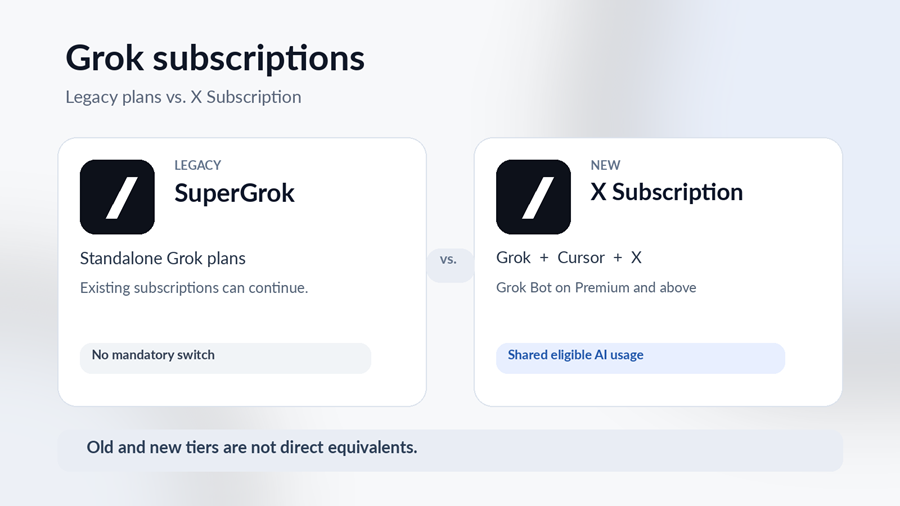
Yes, if you're an existing subscriber. The older plans can continue, and switching to the new X Subscription is optional for now. You don't need to move just because the names on the pricing page have changed.
Two names are easy to mix up: SuperGrok isn't the same as the new $100 Super plan, and SuperGrok Heavy isn't an automatic match for Ultra. The old and new subscriptions come with different features and usage arrangements.
Should you switch from an older plan?
I'd compare what you already have with what you'd actually use in the new bundle. If SuperGrok covers your needs and you barely touch Cursor or X Premium, keeping it may be the simpler choice. If you're paying separately for several of those services, the new plan deserves a closer look.
Before migrating, check which Grok, Cursor, and X accounts you're combining. Account unification can't be undone, and eligible old subscriptions may be cancelled with a prorated refund. App-store subscriptions can involve separate steps. The account-migration instructions cover the cases to check before confirming.
What if you only want X Premium?
You can still choose a subscription for its X features without using Grok or Cursor. Plus includes selected X Premium benefits; Premium and higher tiers include more extensive X benefits, provided you link an eligible personal X account. A checkmark is still subject to X's eligibility rules.
Existing customers with standalone X Premium subscriptions can keep those plans for now. The older X Basic, Premium, and Premium+ prices are a separate comparison, so it's better not to confuse them with Grok's new usage tiers.
Part 5: How to subscribe to Grok
For the full X Subscription bundle, start from the official pricing page linked above, pick a tier, and complete checkout. Available payment methods and taxes depend on where you're buying. Once subscribed, you can manage billing and check your AI allowance in the Grok dashboard.
A note on third-party Grok accounts and top-ups
You'll also come across sellers offering Grok-only accounts or membership top-ups. AccountBoy's Grok listing is one example. Those products should not be mistaken for the complete X Subscription bundle: AccountBoy's Grok top-ups do not include Cursor, Grok Bot, or X Premium benefits.
There is a separate risk to keep in mind. The X Subscription's seller policy says subscriptions are sold directly and that third-party resellers are not authorized. Unofficial subscriptions may be insecure or lose access. Before buying from any third party, check what you're receiving, who controls the account, and what help is available if something stops working. If you want the full, official bundle, buy it directly.
Part 6: Quick questions about Grok pricing
1. Can I pay for just one month?
Yes. All four paid tiers offer monthly billing. If you don't want another charge, cancel before renewal; the service recommends doing so at least 24 hours in advance.
2. What happens when I use up my Grok allowance?
You can wait for the weekly reset or buy additional usage. Keep an eye on paid top-ups and any separate Cursor model charges so the total doesn't creep up unexpectedly.
3. Is the Grok API included in Premium or Super?
Paid subscriptions include API access, but API requests are charged separately. They're not part of the shared weekly AI allowance.
If you're new to Grok, start with Free or Plus and see what you actually use. Premium makes more sense when you need its advanced features; Super and Ultra are mainly about having more room to work. And if you're happy with an older SuperGrok plan, there's no need to rush into a switch.